10 Things You Need to Know About... Taking photos with Android

Before you take photos with your Android smartphone, the results maybe improved by applying these ten tips.

1. Clean your lens


It might sound obvious, but cleaning your phone's camera lens is vital when taking a picture. It doesn't matter how many megapixels your camera is if it's streaked with fingerprints. Use a microfiber cloth or cleaning fluid for best results.

2. Let there be light


Some cameras do better with less light than others, but you need some illumination to take a good shot. For the best results, try to have the source of the light behind and above you, ideally pointing towards whatever it is that you are taking a picture of.

3. Frame the shot


mobile1

Take a second to get the right things in the right places in your viewfinder. Make sure the subject is slightly off-center and is far enough away from the background so that things behind are not in crisp focus.

4. Boost your zoom


Digital zoom isn't as powerful as optical zoom, but few phones offer a proper camera lens. Instead you can buy accessories for your existing phone camera, such as Photojojo's magnetic lens and the Oppo Clip.

5. Shooting modes


Whether you're shooting a landscape or portrait, there's a mode for that. Since there are few actual moving parts in a smartphone camera, software adjusments are used to make all the difference.

6. Change your camera


One of the biggest benefits of your phone camera being digital is that if you don't like it, you can download a new one from the Play Store. Google Camera has recently been updated, while Camera ZOOM FX and VSCO Cam remains popular.

7. Forget the flash


While the Moto X's circular dual-LED flash is leading the way for smartphone camera flashes, they are still best left turned off or used for a flashlight. They sit too close to the sensor and can create harshed and washed-out pictures - not ideal.

8. Take lots of pictures


With no film to waste and lots of cloud storage options, you can never take too many photos. Experiment and take lots of pictures to learn how to capture a good one. Then you can save your favorites.

9. Touchscreen tweaks


MobilePhotographyTipsV4

Google Play is full of photo editing apps from the social Instagram to the advanced Adobe Lightroom, to fix the color, sharpness and saturation of your photos.

10. Take your time


More often than not, phonegraphers snap a photo and share it online instantly. However, if you take your time and set things up just right, you can get some really good pictures from your phone.

Simmer Down! 3 Cooking Techniques you Need to Know

Do you know the methods behind your favorite meals? Master these textbook culinary terms and you'll be cooking with the best of them in no time.

Sautéing


This method of dry-heat cooking, borrowed from the French, requires a hot pan and a dash of oil. Make sure you constantly move the pan and stir your protein or vegetables to avoid burning -- tossing and flipping yield the best results.

Blanching


To retain color, flavor, and texture, bring a pot of water to a boil and cook vegetables until just softened. Afterwards, remove them immediately and plunge into an ice bath (a process known as shocking). The ice water will stop the cooking process and preserve the nutrients in your vegetables.

Braising


A combination of both moist and dry-heat cooking, this technique tenderizes meat - usually tougher cuts like lamb shoulder. After pan-searing, leave it to simmer in a stock or acidic liquid like wine, beer, or tomatoes. The end result is delicate forkfuls that will melt in your mouth.

Meal Ideas for Your Flight

Flying (obviously inside a plane) is expensive enough, especially now that many airlines are charging for checked baggage. Go save yourself a few bucks and pack along some meals to you brought along your flight and eat it there.

1. Hummus, Pita Bread, and Crudites


th

Do your seatmate(s) a favor and hold off on the extra garlic hummus variety. Chop a few of your favorite raw veggies, add a pita or two. All set!

2. Cured/Deli Meat and Cheese or.. Beef Jerky


lunch-meat-italian-cold-cuts

Now is not the right time to break out the spicy salami and Limburger cheese; stick to milder choices like prosciutto or roasted turkey (yum!), and add cheddar or mozzarella cheese.

Hit up your local farmers' market to see if you can source jerky locally; you're likely to find a range of flavors and meats.

3. Quinoa Salad


Quinoa-salad-w-apples-and-feta

Mix veggies, shrimp or cheese with cooked quinoa. Make a dressing using balsamic vinegar, a touch of olive oil, a squeeze of lime, fresh or dried herbs, then pack in a lightweight container. And don't forget a fork.

4. Chicken or Veggie Wrap or Sandwich


Taking an extra 5 minutes to make one of these for yourself before heading to the airport will save you the 8-10 bucks you'll have to spend on finding one once you're past security.


5. Nut Muffin with Fresh Fruit


Delicious and nutrient-dense, these are the perfect make-ahead snack you can bring on the plane instead of buying a granola bar or trail mix on board.

Having A Great Outdoor Dinner Party

I want to have an outdoor dinner party but worry that the weather in my place doesn't always cooperate :( So I need some suggestions.. Whether rain or shine, inside or out, simplicity is the best. The key to a stress-free dinner party is a simple menu built on seasonal flavours.

To start, nothing is easier than crostini. The baguette can be toasted well in advance and topped minutes before guests arrive. Slightly warmed brie with honey and prosciutto (if it's cool out) or whipped butter with thinly sliced spring radishes (if it's warmer) - the possibilities are endless! :D Alternatively, arrange a charcuterie board in advance. Sliced bread and crackers, local cured meat and cheese, and a few quick pickled spring vegetables are all you need for an easy, all-season starter.

Maybe offer a welcome drink in addition to the usual non-alcoholic options. A crisp beer with a slice of lime, a pitcher of fruity sangria or a Spring inspired cocktail can evoke feelings of warn sun-filled days, especially if the weather forces you inside.

When it comes to the main, opt for a lighter meal. Replace the heavier braises and hearty soups of winter with refreshing salads, crisp vegetables and grilled meats. If you're lucky enough to have the grill under cover, go ahead and grill. If you're hosting with a partner or friend, one of you can sneak out to the grill while the other takes care of guests. Even if you're going it alone, guests can socialize over the appetizer while you pop out to finish the main. Easy grilled options include a marinated flank steak served with chimichurri or, if available, a whole trout stuffed with lemon and fennel.
the key to a stress-free dinner party is a simple menu built on seasonal flavours.

If, however, grilling is out of the question, recreate BBQ favourites inside. Burgers can be juicy and perfectly cooked in the oven; flank steak is quickly seared in a cast iron skillet instead of outside. Quick grilled (or roasted) asparagus and a crisp salad of thinly sliced fennel, avocado, grapefruit, and the season's first greens, pairs perfectly with whatever main you choose.


Remember also to keep it casual. Whether basking in the sun of the backyard or gathered around the dinner table, serve the main family style. Not only will this allow you more time with your guests, it takes the stress out of plating courses.

Whatever Mother Nature throws at you, you can never go wrong with good food and great company!

ToBa Dreams (2015) Honest Movie Review

Spoiler inside... I think.

ToBa Dreams' Synopsis


This movie is about love story. Not just love story, this is based by loving-too-much story. Love that sometimes get lost in finding the truth. Just like Sergeant Tebe (Mathias Muchus) that educate their children just like combat troops due to his extraordinary love to them. When it comes to great conflict between the eldest son Ronggur (Vino G Bastian) that becomes a rebel to his family, the stubborn Ronggur finds his true love in Andini (Marsha Timothy), a noble lady that has a different religion.

142967741317144_300x430Yes, this movie is about Sergeant Tebe's dreams which want to live peacefully with only pension money and chooses to build his hometown. But Ronggur declined, he wants to prove that his father is wrong in choosing a life path. With conflicts, Ronggur become a drug mafia and seized Andini from her parents which don't approve their relationship.

Does in the end every human can reach their dreams and swim happily into their destiny? Within glamorous Jakarta and peaceful Toba Lake, Sergeant Tebe, Ronggur, and Andini draws their destiny drama. In Toba Lake, their dream and love begins.

My Honest Review about ToBa Dreams


This movie is quite long (144 minutes) but I don't feel sleepy at all. For 144 minutes I just hold my eyes (and nose) to not to cry. I just too ashamed to cry in public :( This drama gives many short conflicts that relates to another conflict and it successfully made up and downs in our emotions.


Typical plot, but because of the great act from actors and actress (director and co director were taken big part on it too), it can give you remarkable lines and moments. For example, the moment when they were joking, but 5 seconds later I just want to cry again because after they was joking, there was an irony.

ToBa Dreams bring great cinematography taking place around Toba Lake and Jakarta. Loved the color tone too!

The ending? Not quite surprised because the filmmaker already gives us a clue about it, but the ending is not the ending that I want.

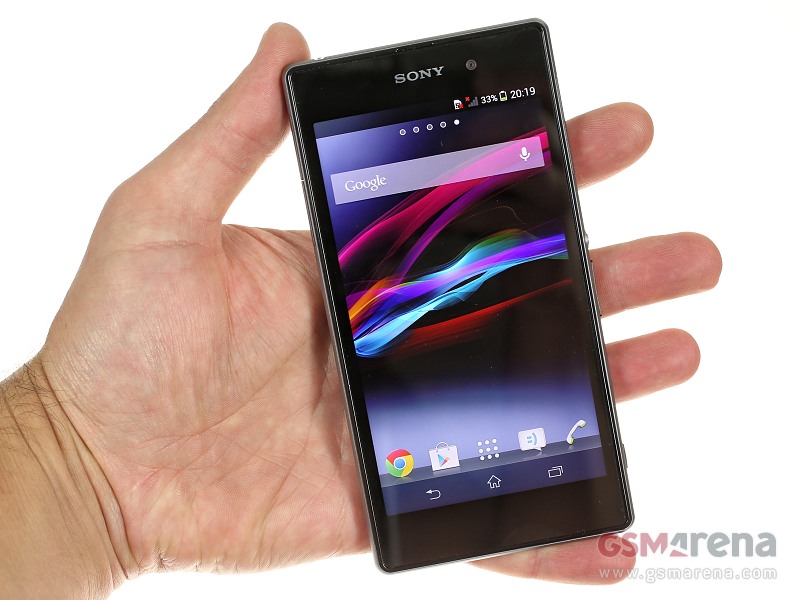
Xiaomi Mi 4 vs. Sony Xperia Z1, Which One Should I Buy?

I am looking for a new Android smartphone, because my current phone is Windows Phone and I want to back again into Android just because.... I need more updated apps and games there (Or maybe I'm just tired of being hipster? lol). My primary needs is big storage and great camera feature. With no more than IDR 5.000.000 (+ USD 385) budget, I narrowed down some options to only 2 left, which are Xiaomi Mi 4 and Sony Xperia Z1.

Xiaomi Mi 4 and Sony Xperia Z1


They both have...

  1. 4G ready

  2. 5.0 inches display

  3. 1080 x 1920 pixels display

  4. have great design (for me it's great, Samsung is somehow too boooooring)


Xiaomi Mi 4 plus points


  1. 21 grams lighter

  2. The dimension is smaller and it suits more in my small hands

  3. Its MIUI giving me an instant plus points! I just love default beautiful UI

  4. 3 GB RAM (Z1 only 2 GB)

  5. 8 MP secondary camera! (Z1 only 2 MP)

  6. Newer processor generation than Z1

  7. Faster 2.5 GHz processor (Z1 only 2.2 GHz)

  8. Battery capacity is 3080 mAh (Z1 only 3000 mAh)


Sony Xperia Z1 plus points


  1. Dust proof and water resistant over 1 meter and 30 minutes!!

  2. Has external card slot up to 64 GB

  3. 20.7 MP main camera! (Mi 4 only 13 MP)


So...


Xiaomi Mi 4 has many strong plus points, but Mi 4 doesn't have external card slot (which I needed the most). This what should I buy section is getting more dilemma. For now maybe I decided to buy Sony Xperia Z1, but still seeking for the better front camera if any. That means I should save more money to get better smartphone I want.

Eucalyptus Candy

Eucalyptus candy is a traditional herbal candy usually produced in Australia, Italy, or even Indonesia. This candy has some other name like Eucalyptus Menthol Sticks, Eucalyptus Cough Drops, or Eucalyptus Throat Drops. Eucalyptus candy has proven by many people for soothing sore (or dry) throats, coughs, and colds. Usually fills the candy bowl at home, at the office, or at doctor's room. Bulkbarn.ca said that eucalyptus candy is great for diabetics or for anyone looking for a healthier alternative to candies with some sugar.

Other benefits of eucalyptus candy is they are also good for keeping the mouth fresh, and one little chip works for a long time. Not like in Indonesia where Eucalyptus candy just costs from $0.4, The branded Chipurnoi Chips Menthol Eucalyptus Candy costs about $42 ! But if you think the price is too expensive for a candy, note that someone's mom that had chronic dry mouth and throat (Sjogrens Syndrome), recovered because of eucalyptus candy.

Verified Source

Getting Rid of Annoying "EWWW Image Optimizer Requires exec()." Message

Imaging on Wordpress is really a big issue when it comes to page speed. When I must deactivate WP Smush It because it caused me a problem (Read How I Solve HTTP Error When Uploading Images in Wordpress), the blog's page speed decreases dramatically :(

So, I try to look across another options of image compressing plugin (which is free) and many people recommends EWWW Image Optimizer. Probably it was the best free plugin available on WP for keeping your images compressed.

Then I install it, but after installing the plugin (and activating it) shows the annoying message like "EWWW Image Optimizer Requires exec(). Your system administrator has disabled this function." or exec() is disabled in your server, please contact hosting provider blah blah blah something like that. As I only using cheap shared hosting (not VPS or Dedicated Server), I seek for a solution that works for shared hosting.

The solution is to remove exec from the disable_functions parameter in your php.ini file and then restart your web server process (apache or nginx), and/or possibly php-fpm if you use that. (Source: plugin author). But, it doesn't work with my cheap shared hosting.

Then, I found an angel named David Byrne that gives the tricky solution to (finally) enabling EWWW Image Optimizer on your Wordpress blog in shared hosting. Actually, Byrne tried it in a Reseller Hosting account, but I am the one who tried it in a Shared Hosting.

It will take only a minute to try and (maybe) with no loss. Maybe.

1. Login to your Cpanel.


2. After that, go to "Software & Services" Section.


Choose "Select PHP Version".


3. Switch to 5.5


4. Click "Switch to PHP settings"


Don't forget to save.


5. That's it. Problem magically solved :D


Hope this works on you :*

Semi Matte Hair Styling Cream

According to Hairstyle on Point, there are only 2 types on male hair product. What are they?

Pomade


To achieve a wet looking slick hair style, pomade is essential.

Hair wax


To achieve a dry matte looking style, hair wax is essential.10476011_786769734770635_8546536688628167039_n

But, What about semi matte hair styling cream?

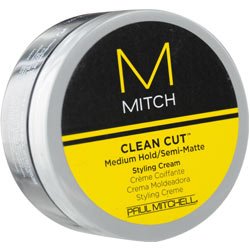
Semi matte hair styling cream forms clean and no-fuss looks. Semi matte hair styling cream lets you shape and reshape (hair of course) with lasting control and still can manage your looks later. The cream has the quite unique texture and works well on any type of hair.

One famous brand that sells semi matte hair styling cream is Paul Mitchell. I consider it a ridiculous (but kinda effective marketing strategy) feature. Some of them are gluten free and vegan (wut?).

Then, where to buy any Semi Matte Hair Styling Cream (especially those that labeled Paul Mitchell)?


maybe THIS LINK. don't worry, it's not that expensive.


How I Solve HTTP Error When Uploading Images in WordPress

Another case study and experience-base post by ADD (did you already read ADD's about visual and text editor not showing in wp-admin?) Migrating to Wordpress given us some issues, but we think wordpress is still the best blogging platform (yet).

For about 5 days I've been frustrated not able to upload images in Wordpress because of its "HTTP Error." annoying message.


Way 1


Go to the image which you want to upload to WordPress.
Just Rename it, i.e. remove the old name and replace with a new unique name. (Don’t afraid, for better SEO, you can change the image name after uploading to the WordPress Library)

Result: Not working :(

Way 2


Edit .htaccess file and add following lines of code:
<IfModule mod_security.c>
SecFilterEngine Off
SecFilterScanPOST Off
</IfModule>

or putting this line in very top of your .htaccess file (tried this and my blog just went down):
AddType x-mapp-php5 .php

Result: Still not working...

Way 3


Changing Wordpress' size limit of file uploads at wp-config.php. Add this line:
define('WP_MEMORY_LIMIT', '128M')

Result: Still not working...


Way 4


Installing No Flash Uploader plugin.

Result: Still not working...

Way 5


Modifying file/folder permissions. In this case, update the wp-content/uploads folder's permission to at least 744 or 755

Result: Still not working...

Last Way


Honestly I already give up before I try this. Never think of it because it was too simple and I thought that won't solve the problem. All I did is deactivating WP Smush it plugin and then image upload works fine. OMG. Hope this helps.


[FIXED] Visual and Text Editor not Showing in WP-Admin

So I was having a night on my friends' and as usual, I want to update this blog. When I clicked on Add new post, something occurred and made me panic. That was my visual (and text) editor not showing! Tried to calm, I googled some solutions and tried them all. These are the conclusion, maybe one of them works for you.

Experiment 1: Change wp-config.php file


Edit the wp-config.php (located on root of your wordpress folder) and add a line like this:
define('CONCATENATE_SCRIPTS', false );

Result: not worked for me.

Experiment 2: Open wp-admin in another browser/incognito (I use Chrome)


Result: not worked for me.

Experiment 3: Modifying Plugin(s)


deactivating all plugins to see if this resolves the problem. If this works, re-activate the plugins one by one until you find the problematic plugin(s).

Result: not worked for me.

Experiment 4: Reupload (or Reinstall)


re-uploading the wp-admin and wp-includes folders from a fresh download of WordPress.

Result: I didn't try this way because it looks so hard because it needs re-config that I consider it troublesome :p

Experiment 5: Force reload browser


Make sure to let the page load completely before start editing.

Windows: CTRL + F5
Mac/Apple: Apple+R or command + R
Linux: F5

Result: Nooot worked.

Experiment 6: Delete browser cache


I use Chrome and went to Settings > Clear browser data... and checked only Cached images and files.

Result: And finally it worked, just like that.


Hope this post helps you :*

Anw, this is ADD's first post in English. Just in case if you interested.